





In an era where global events – from natural disasters and conflict to tragedies close to home – dominate the headlines and our feeds, it’s more important than ever to protect our mental health while staying reasonably informed.
Repeated exposure to graphic, distressing or sensational content on social media is linked with increased stress and anxiety, and over time can erode our emotional resilience. Taking active steps to curate what you see isn’t about turning a blind eye – it’s about safeguarding your wellbeing so you can engage with the world without becoming overwhelmed.
Why curating your feed matters
Algorithms aren’t neutral. They’re designed to keep you scrolling, often by pushing content that’s sensational, shocking or emotionally charged.
And while it’s crucial to understand what’s happening in the world, consuming an endless stream of distressing posts can increase anxiety and feelings of helplessness. Consciously managing your feed means prioritising your mental health without disengaging from issues you care about.

Here’s how you can take practical control over your social media feeds so you see less sensitive content, without completely disconnecting from the news and conversations that matter.
How to see less sensitive content on Facebook
Facebook doesn’t have a single ‘hide all distressing stuff’ button, but there are several settings and actions you can use to tailor your experience:
Adjust your content preferences
Open the Facebook app and go to settings and privacy → settings → content preferences. Here you’ll find options such as sensitive content (to reduce graphic or upsetting topics) and manage favourites to prioritise the people and pages you trust most.
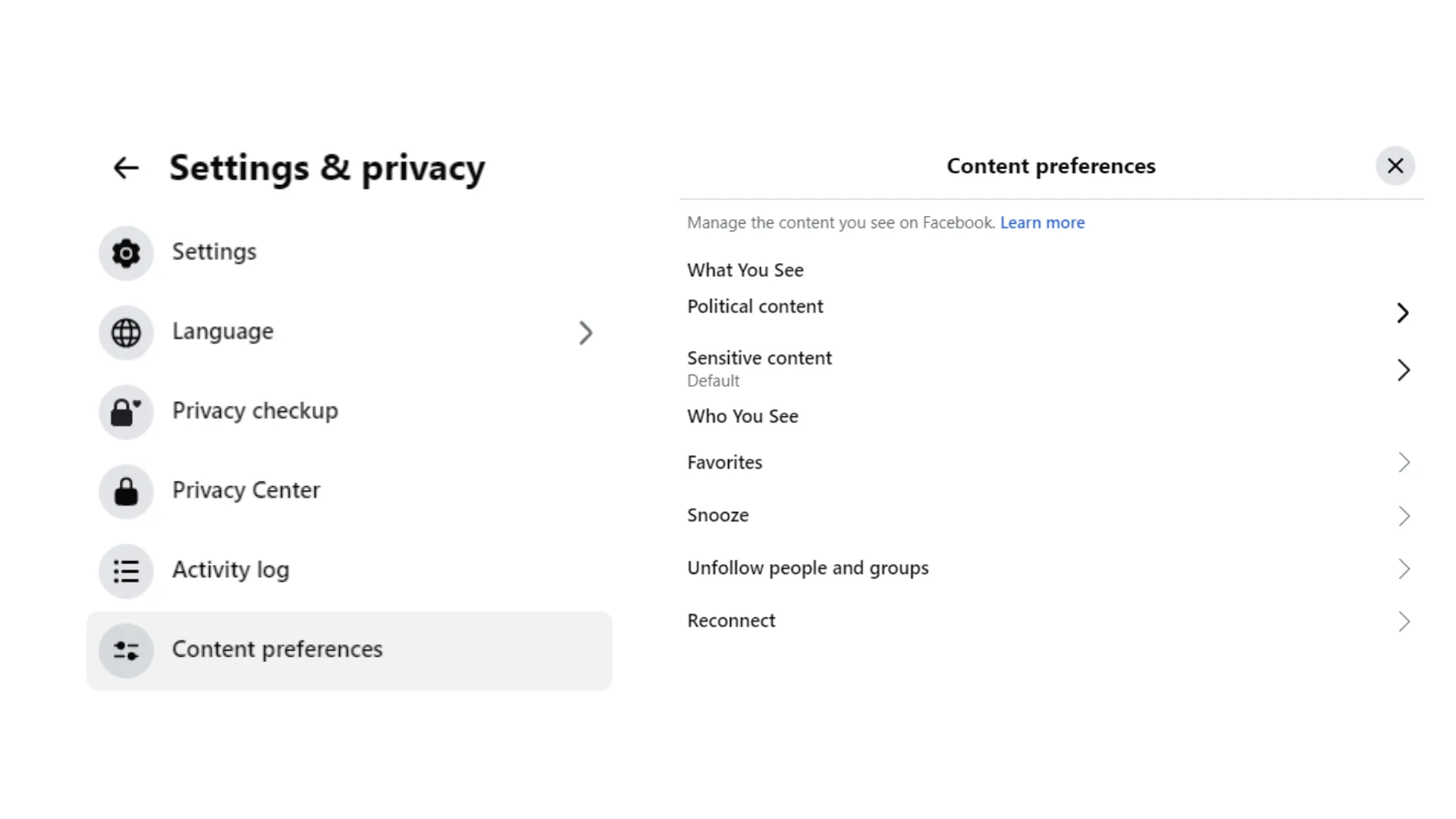
Prioritise friends and trusted pages
Use the favourites feature to ensure posts from close friends, family and reliable news sources show up higher in your feed.
Unfollow or snooze accounts
If a person, page or group regularly shares distressing content, unfollow or snooze them for 30 days. This doesn’t unfriend them, but it tells Facebook you’d prefer not to see their posts.
Use ‘see less of this’ and ‘not interested’
When a post shows up that you find upsetting, tap the three dots in the corner and select see less of this or not interested – this sends feedback to the algorithm about what you don’t want to see.
Reserve dedicated news time
Consider using Facebook mainly for updates from trusted outlets rather than general browsing –this reduces the chance of doomscrolling and accidental exposure to sensitive material.
How to see less sensitive content on Instagram
Instagram lets you specifically adjust how much sensitive content you see – that includes things the platform may deem potentially upsetting or offensive, even if it doesn’t violate community standards.
- Open the Instagram app on your phone.
- Tap your profile icon in the bottom right.
- Tap the menu (☰) in the top right, then choose settings and privacy.
- Navigate to content preferences (or what you see).
- Select sensitive content control. You’ll see options like more, standard or less – choose less to reduce the amount of potentially upsetting posts recommended to you.
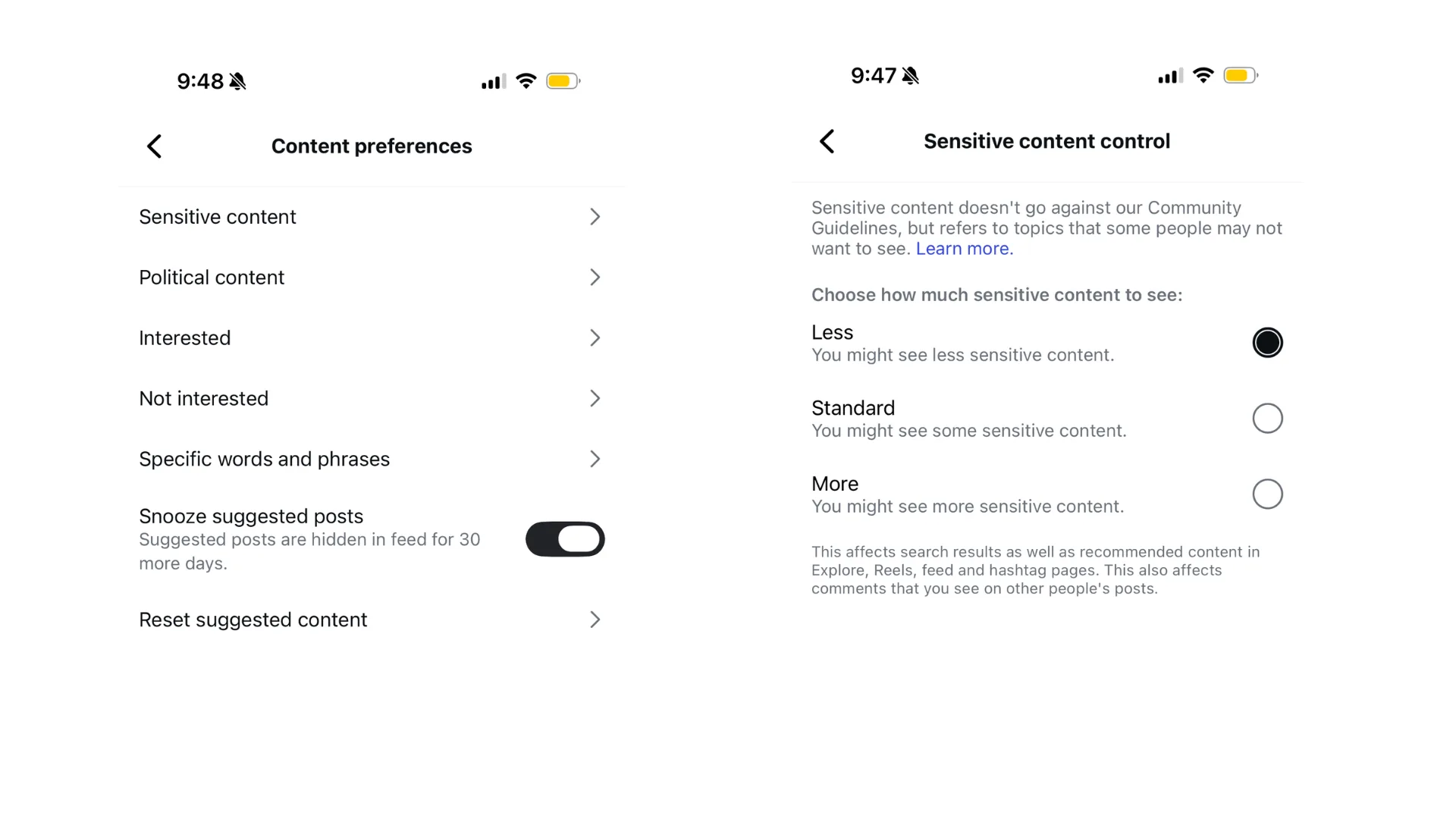
It’s worth noting this affects recommended content (like Explore, Reels and suggested posts) but doesn’t change what people you follow post directly.
Additional tips to curate your social media feeds
Unfollow accounts that repeatedly post graphic content. If a feed consistently makes you feel uneasy, it’s okay to hit unfollow or mute.
Use keyword filters where possible. Some platforms let you mute specific words or hashtags so posts containing them won’t appear.
Turn off autoplay for videos. That way, you aren’t automatically exposed to content that might be distressing.
Set boundaries. Designate phone-free times (like meals or bedtime) to break cycles of passive scrolling.
Protecting your peace of mind doesn’t mean you’re ignoring the world – it means being thoughtful about how you engage with it.
Remember: social media should be a place that informs, connects and inspires you – not one that leaves you drained. With a few mindful tweaks to your settings and habits, you can reclaim control of your feed and protect your mental health while still staying engaged with what matters.
If you are struggling, help is available.
The NSW Health Mental Health Line is available 24/7 on 1800 011 511.
For crisis support, call Lifeline on 13 11 14.
Children and young people can call Kids Helpline on 1800 55 1800 or chat online.